Change the system.
Keep the coaching you built.
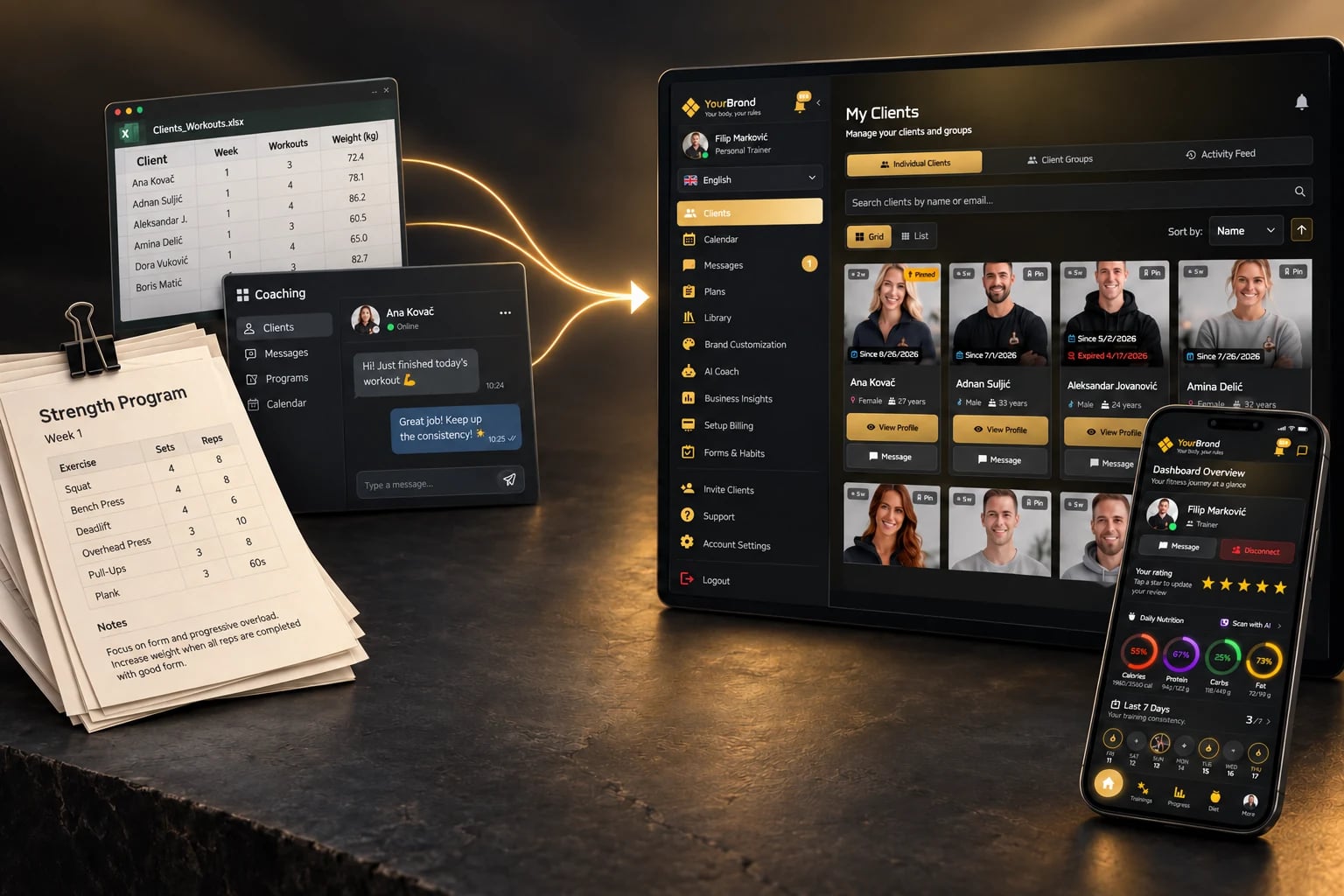
Your programs, clients and way of working come with you. We help you move, at no migration cost.
Also available on Apple Watch & Wear OS
- Ready to switch?
Moving data is not migration.
Most migration pages stop at "import complete". For us, the move is finished when you and your clients know how to carry on coaching.
DATA TRANSFER
- Clients are copied across
- Programs are imported
- The old tool is switched off
A REAL TRANSITION
- You know where everything lives and how your day runs
- Your first clients are using the app
- The rest of the roster follows when it works
The transition plan, step by step.
Five steps, and each one answers a question you probably have right now.
Show us how you work
Do I have to prepare anything?
No. Send what you have: PDFs, spreadsheets, screenshots or an export from another platform.
We set up the structure
Will I have to enter everything myself?
No. We bring your programs, clients and materials into Trainera, at no migration cost.
You test with real clients
Do I have to risk my whole roster?
No. Pick two or three clients you already coach and run a few real weeks with them on the Free plan. No card, no deadline.
We help onboard your clients
What happens to my clients?
They get an invite link, open the app and find their program, nutrition, progress and messages. Their first workout or meal gets logged in week one.
You move the rest when it works
When do we actually switch?
When you have seen it hold up with real clients. Not before.
What actually moves.
Before we start, you get a clear list. No surprises halfway through.
What we bring across
- Clients and their contact details
- Training plans and workouts
- Nutrition plans and meals
- Exercises you created yourself
Depends on your setup
- Progress history and measurements
- Photos and documents
- Anything that only exists inside chat threads
What stays where it is
- Message history from WhatsApp, Viber or Instagram
- Payment history from other tools
- Subscriptions billed by another platform
What you do, what we do.
Your part
- Show us your current setup
- Pick the first clients to test with
- Confirm that what we set up is right
- Move the rest when you give the go-ahead
Our part
- Import your programs and clients
- Help you structure your plans and pricing
- Support onboarding for your first clients
How long it takes.
There is no fixed number of days, because it depends on how many clients and plans you have and on what your export contains. Once we have seen your export, the team confirms the timeline with you. You do not have to wait for it: open a Free account the same day and test with up to 3 clients.
What happens to your clients during the switch.
Your old tool keeps running
Nothing is switched off until you decide. Your clients keep training where they are while we set things up.
Nothing changes until you invite them
Each client gets an invite link, opens the app on web, iOS or Android and finds their program, nutrition, progress and messages.
You move them in batches
Start with two or three clients, check that everything is right, then invite the rest.
Coming from another coaching platform?
Trainerize, MyPTHub, TrueCoach, Kahunas, Everfit or something similar. Send us your export and we'll take it from there.
Where to export from Trainerize, My PT Hub and TrueCoach
Export your clients and programs as CSV or PDF files from your current tool, whether that is Trainerize, My PT Hub, TrueCoach or another platform, and send them to us. If you cannot find an export in your account, ask that tool's support for one. Clients, programs and the exercises you created come across reliably; progress history, photos and documents depend on what the export contains.
Cancelling your old subscription.
Wait until your clients have accepted the invite
You may still need read access to the old tool while the last clients move across.
Check the notice period
Look at whether you are on a monthly or yearly plan and when the paid term ends.
Download invoices and payment history
They do not move across to Trainera, so keep a copy for your records before you cancel.
Tell your clients once
One message about what changes for them and what stays the same.
Proof you can check yourself.
We do not have a library of migration case studies yet, so we will not pretend to. Here is what you can check today.
The plan
The five steps on this page are the actual process.
The app
Create a free account and open every screen before you send us anything.
Your clients
Three real clients on the Free plan tell you more than any quote would.
Migration FAQ
It depends on how many clients and plans you have and on what your export contains, so we do not promise a fixed number of days. Once we have seen your export, the team confirms the timeline with you, and you can start testing on the Free plan the same day.
Export your clients and programs as CSV or PDF files from your current tool, or ask its support for an export, and send the files to us. Check what the export contains before you cancel, because anything that is not in it cannot be imported.
After your clients have accepted their Trainera invites and you have downloaded your invoices and payment history, which do not move across. Check the notice period first, and whether you are on a yearly plan that runs to the end of the paid term.
Your clients, your training plans and workouts, your nutrition plans and meals, and the exercises you created yourself. Progress history, photos and documents depend on how you keep them today, so we go through them with you before we start. Chat history and payment history from other tools stay where they are.
You show us your current setup, pick the first clients to test with and confirm that what we set up is right. We handle the setup and import, help you structure your plans and pricing, and support onboarding for your first clients.
Nothing changes for them until you invite them. Each client gets an invite link, opens the app on web, iOS or Android and finds their program, nutrition, progress and messages in one place. We help you with that first onboarding.
No. Start with up to 3 clients on the Free plan and keep coaching everyone else the way you do today. You move the rest of your roster when you have seen the workflow hold up with real clients.
That is exactly what the test is for. You find out with two or three clients on the Free plan, without a card and without a deadline, before you change anything for the rest of your roster.
Yes, and we do it for you at no cost. Send us your exports from Trainerize, MyPTHub, TrueCoach or any other platform and we bring your clients, plans and content over. How much comes across depends on the plan you pick: the Free plan holds 3 clients, paid plans scale up from there.
No. There is no migration fee on any plan. What you pay for afterwards is your Trainera plan, and the Free plan holds up to 3 clients.
Start with a few. Move the rest when it works.
You do not have to move your whole business to find out whether Trainera works for you. Start with a couple of clients. When the workflow holds up, we move the rest.
- Create your free account
- Send us what you have
- Test with your first clients, then move the rest