Gym Check-In and Access Control Software: A Practical Guide for Owners
Memberships, check-ins, staff and payments in one place
Choosing the right check-in and access control system shapes how members enter, how staff spend their time, and how tightly access ties to billing. This guide breaks down the options so you can pick what fits a small-to-mid gym.
Why check-in and access control matter more than they seem
The front door is the most-used feature in your gym. Every member touches it, often several times a week, and every one of those moments is a chance to save staff time, confirm a payment, or lose a member to friction. Yet many gyms still run on paper sign-in sheets or a receptionist ticking names off a list.
Modern check-in and access control software turns that daily ritual into clean data and a smoother experience. It tells you who is in the building, whether their membership is valid, and how busy each hour really is. For a small-to-mid gym, getting this right frees up staff and protects revenue at the same time.
Memberships, check-ins, staff and payments in one place
The main types of check-in
There is no single correct method. The best gyms often mix two or three depending on their layout, hours, and membership base.
QR and app check-in
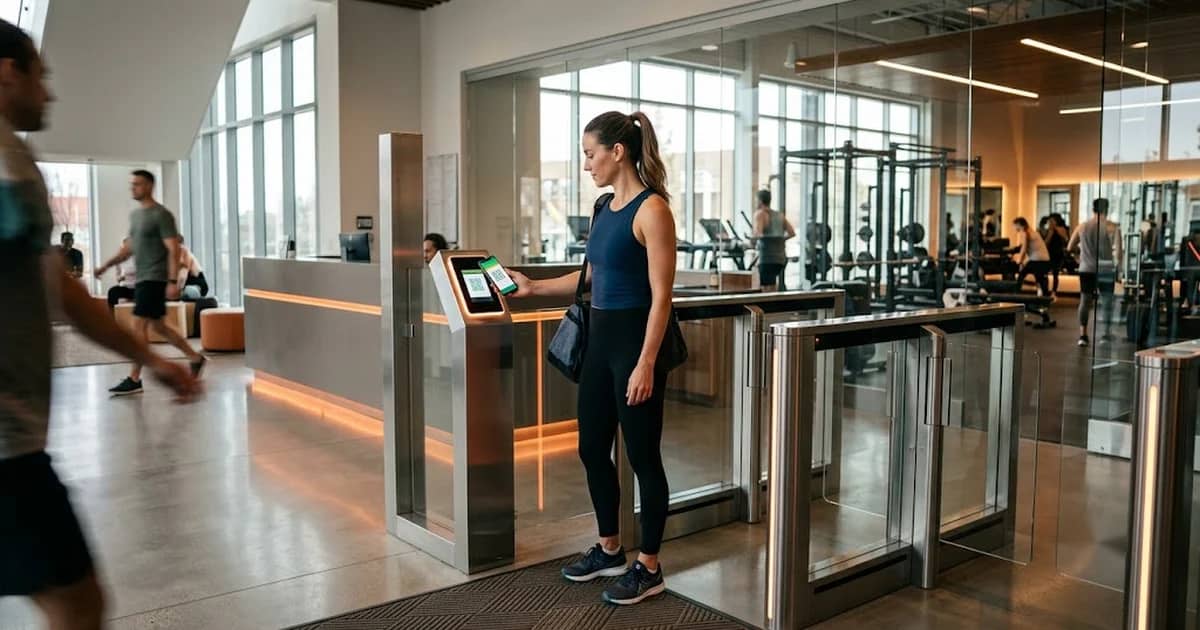
The member opens your app or a saved code and scans it at a reader or tablet. It is fast, cheap, and hard to share because the code can rotate or tie to a live account. This is the most common modern default because it needs almost no hardware beyond a scanner.
Key fobs and access cards
A physical fob or card taps a reader. Members find it familiar and reliable, and it works without a phone or signal. The downsides are the ongoing cost of the fobs, the admin of issuing and replacing them, and the ease of handing one to a friend.
Self-service kiosks
A tablet or terminal in the lobby lets members check in themselves, buy a day pass, or update details. Kiosks cut queues at busy times and reduce the load on your front desk without removing the staffed feel entirely.
24/7 and unstaffed door access
Here the software controls an electronic lock, turnstile, or gate directly. Members enter outside staffed hours using an app, fob, or PIN. This unlocks new membership tiers and extended hours, but it raises the bar on security, insurance, and reliable hardware.
What to look for when choosing a system
Feature lists blur together quickly. Focus on the handful of things that actually change daily life at the gym.
- Speed at the door. A check-in should take a second. Slow scans create queues and frustration.
- Reliable offline behaviour. If your internet drops, can members still get in? Good access hardware caches permissions locally.
- Real-time membership checks. The system should know instantly whether a member is paid up.
- Clear attendance analytics. Peak hours, no-shows, and class capacity should be visible without exporting spreadsheets.
- Simple staff tools. Front-desk staff should be able to override, add a guest, or fix a mistake in seconds.
- Hardware flexibility. You want a system that works with common readers and locks, not one that forces one expensive vendor.
How check-in ties to membership status and billing
This is where software earns its keep. When check-in is connected to your billing, the door itself enforces payment. A member whose card was declined can be flagged the moment they scan, prompting a friendly reminder rather than weeks of silent free access.
Well-designed systems let you set the rules: block entry immediately, allow a short grace period, or simply notify staff to have a quiet word. The goal is not to be harsh but to make sure the people training are the people paying. For a gym with hundreds of members, even a small share of lapsed access adds up to real lost revenue every month.
Tying access to billing also cleans up your data. Instead of reconciling a sign-in sheet against a separate payment system, you have one source of truth: who came in, when, and whether their account was in good standing.
Security and data considerations
Check-in data is personal data. An attendance log shows when a specific person is at your gym, which is exactly the kind of information privacy laws protect. Treat it with care.
Practically, that means a few habits. Limit access to attendance records to staff who genuinely need it. Do not keep logs longer than you have a reason to. Be clear with members, in your terms and at sign-up, about what you collect and why. If you use unstaffed access, add camera coverage at entry points and a clear incident process, because an empty gym raises safety and liability questions that a staffed one does not.
On the hardware side, favour readers and locks that fail safely, meaning they behave predictably in a power cut or network outage. Ask any vendor how member data is stored and whether it is encrypted in transit and at rest.
The staff time you get back
The clearest return on a good system is hours. A receptionist who no longer checks names, chases lapsed payments at the desk, or manually logs attendance can spend that time on tours, retention, and sales. For gyms running on thin margins, that shift matters more than almost any single feature.
Automated check-in also removes the awkward human moments: no staff member has to personally turn away a member whose payment failed, because the system handles it consistently and without judgement. That consistency is fairer to members and easier on your team.
How a branded member app changes the picture
A branded app pulls check-in, billing, bookings, and training into one place your members already carry in their pocket. Instead of a separate fob, the app becomes the key. Members open it, scan or tap in, and the same app shows their plan, next class, and payment status.
Trainera is an all-in-one AI fitness platform that gives gyms management tools, including app-based member check-in, plus a branded member app of their own on the White Label plan (on Core, members use the Trainera app). White Label works the same way for a physical gym, a fitness studio or a fully online gym: you manage all clients like a gym, with memberships, which trainer works with whom, when they train and their training plans. Because check-in, membership, and billing live in the same system, access reflects payment automatically, and with the gym's own app, your brand, not a generic vendor's, is what members see every time they walk in.
If you are weighing your options, start by mapping how members enter today and where staff lose the most time. A short trial of app-based check-in will tell you quickly whether it fits your floor and your members.
Turnstiles, gates and doors: how Trainera sets up the entrance
Trainera can arrange the whole entrance, not only the app side. It recommends the hardware, a local access-control partner installs it, and Trainera connects the gate to the gym's account and tests it with real member cards. Where Trainera has no installation partner, any access-control installer can connect the gate to Trainera's check-in API, with help on a call.
- Tripod turnstile: the classic gate for a single lane.
- Speed gate: glass wings that open and close quickly at a busy entrance.
- Swing gate: a wide accessible lane for wheelchairs, prams and equipment.
- Electric strike or magnetic lock: on an existing door, with a QR reader on the wall.
The member opens the QR member card in the Trainera app, or in the gym's own app on White Label, and holds it to the reader. The gate asks Trainera on every scan and gets an allow or deny answer. Expired, suspended or inactive memberships, used-up daily or monthly entry limits, unknown members and invalid codes are refused, since member QR cards are signed. A frozen membership unfreezes at the first entry with the frozen days added back, and a repeat scan within two minutes counts as one entry.
The connection is included on every gym plan, for up to 10 gates, readers or doors per gym; hardware and installation are quoted per entrance. Existing turnstiles and locks can often stay if the reader is a 2D imager that reads QR codes from phone screens. The gate needs internet, so the gym decides before installation whether it opens or stays locked if the connection drops, while reception keeps checking members in offline against the saved member list. Details are on the turnstiles and door access page.
Common mistakes to avoid
A few missteps show up again and again. The first is buying more hardware than you need: installing turnstiles and 24/7 locks before you have proven demand for extended hours ties up capital that would serve you better elsewhere. The second is choosing a closed system that only works with one vendor's readers, which leaves you stuck when prices rise or support slips.
A third mistake is treating check-in as separate from billing and bookings. When these run in different tools, staff spend their days copying information between systems and members get a disjointed experience. Finally, do not ignore the fallback path. Phones die, apps crash, and internet drops, so always have a way for a member to get in when technology fails, whether that is a fob, a staff override, or a cached permission.
Gym check-in in the UK, Australia and Canada: what changes
Check-in hardware works the same in every country. What changes is the law around the data it produces and the contract rules that decide when you may stop a member at the door. An attendance log is personal data in all three countries, and anything health-related that sits next to it (injuries, a PAR-Q, medical notes) raises the bar.
| Country | Privacy law for member data | Regulator | Contract rule that affects access |
|---|---|---|---|
| UK | UK GDPR and the Data Protection Act 2018; health data is special category data | ICO (data protection fee from £52 a year) | Subscription rules from January 2027: reminders and an easy exit; guidance not fully published |
| Australia | Privacy Act 1988 and the 13 APPs; a gym collecting health information is covered whatever its turnover | OAIC | Queensland: 48-hour cooling-off; NSW: no pre-paid fees beyond 12 months |
| Canada | PIPEDA; Alberta, BC and Quebec have their own laws; health data is generally sensitive | Office of the Privacy Commissioner of Canada | Ontario: 10-day cancellation right and a 1-year maximum term |
Two habits help everywhere. Keep health answers out of the check-in view, so reception sees "active, paid" and nothing more. And write your access rules for missed payments into the membership terms, because the debit schemes (Bacs, BECS, PAD) give members strong rights to cancel or dispute through their bank, and a door that locks someone out must match what the contract says.
In Trainera, members check in with a QR code on the digital member card in their app, or staff check them in manually from the gym overview, and each check-in is recorded with its source. The gym is the controller of that member data and should check its own obligations. More detail by country: the UK, Australia and Canada; for the scan-and-go side, see gym QR check-in.
Putting it together for a small-to-mid gym
You do not need every option at once. Most gyms do well starting with app or QR check-in tied to live membership status, keeping fobs as a fallback, and adding unstaffed door access only when extended hours justify the hardware. Choose a system that grows with you, keeps member data safe, and puts your brand front and centre.
Map your own entrance first, then match the tools to it rather than the other way around. The right setup should feel invisible to members and quietly reliable to staff. Get the door right, and everything behind it runs more smoothly.
Run a gym or studio? Trainera brings memberships, QR check-in, a branded member app (on White Label) and payouts into one gym management software. Start a 7-day free trial, no card needed.
Frequently Asked Questions
What is the difference between check-in and access control?
Do I need 24/7 door access hardware for a small gym?
How does check-in connect to membership billing?
Is member check-in data sensitive?
Can a branded member app replace key fobs?
Does a small gym in Australia have to follow the Privacy Act for member check-in data?
Can Trainera install turnstiles or door locks for my gym?
Keep Reading
Memberships, check-ins, staff and payments in one place
QR and turnstile check-in, membership packages, staff logins and a gym website, with no per-member fees. We move your members from your current software for free.